V Rising
Rent a V Rising Server
Rent a V Rising Server
Genre:
Survival
Studio:
Stunlock Studios
Publisher:
Stunlock Studios
How do I use Admin Commands on my V Rising server?
Admin Commands can greatly simplify the administration and maintenance of a server for said admin. V Rising also offers the possibility to open a console and perform certain actions with various commands.
How to open the console?
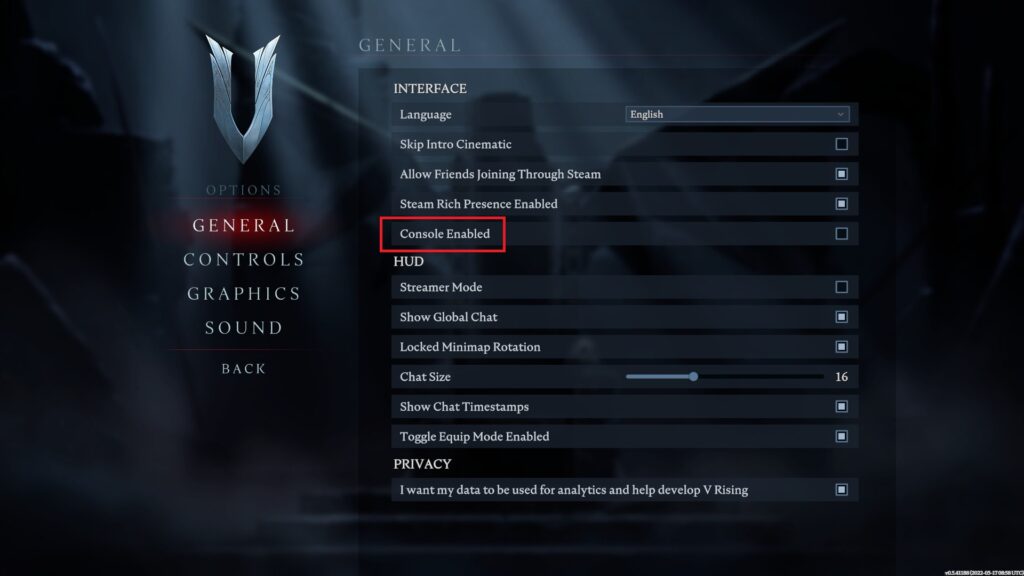
Follow the steps below to activate and open the console in the game:
- Launch V Rising via Steam
- Open the options in the main menu
- Then select “General”
- Under the heading “Interface” you will find “Console Enabled”
- Check the box at the right side to activate the console
- In the game you can now press § (EU keyboards) or ` (UK/US keyboards) to open the console
- If you want to use admin commands, you must enter adminauth in the console
Hint V Rising currently offers a total of 84 different commands, which you can display in the console with the list command.

