Home
/
Wiki
/
Euro Truck Simulator 2 / American Truck Simulator
/
How do I add a moderator on my ATS or ETS2 server?
Euro Truck Simulator 2 / American Truck Simulator
Rent a Euro Truck Simulator 2 / American Truck Simulator Server
Rent a Euro Truck Simulator 2 / American Truck Simulator Server
Genre:
Simulator
Studio:
SCS Software
Publisher:
SCS Software
How do I add a moderator on my ATS or ETS2 server?
A moderator is a player with extended permissions. This allows a moderator to influence the time on a server, for example. To do this, he uses the following command:
/set_time HH:MM
(H = hour, M = minute)
In order to add a new moderator to your server, you will need their SteamID64.
To find out the Steam ID of a player, you can use the STEAMID I/O website.
Then proceed as follows:
- First stop your server via our web interface
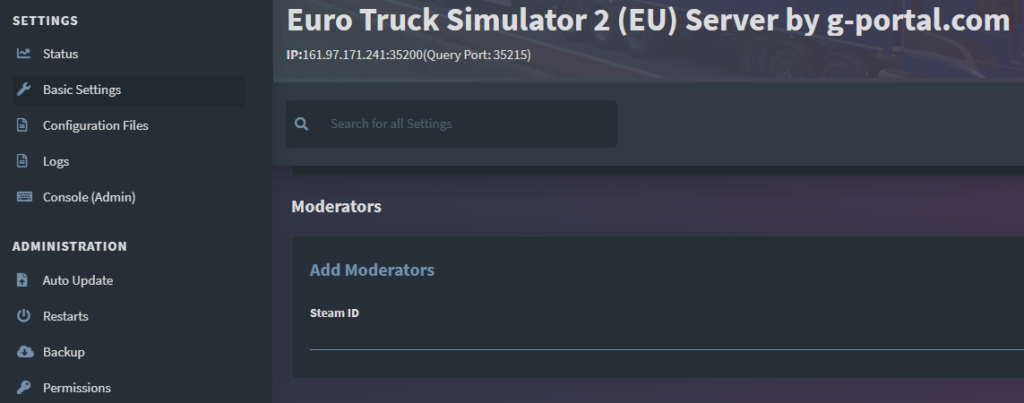
- Then click on the basic settings on the left
- Scroll down to the bottom of the basic settings and you will find the section “Moderators”
- Enter the Steam ID of the player mentioned above and click on the small “Add” button on the far right side of the screen
similar articles

Euro Truck Simulator 2 / American Truck Simulator
How do I activate the ingame console in ETS2 or ATS?

Euro Truck Simulator 2 / American Truck Simulator
How can I disable player damage on my ETS2 or ATS server?

Euro Truck Simulator 2 / American Truck Simulator