7 Days To Die
Rent a 7 Days To Die Server
Rent a 7 Days To Die Server
Genre:
Survival
Studio:
The Fun Pimps
Publisher:
The Fun Pimps
How do I connect to the 7 Days To Die Server?
What are the connection options to the 7 Days to Die server?
There are several ways to connect to the 7 Days to Die server. We will introduce you to several methods:
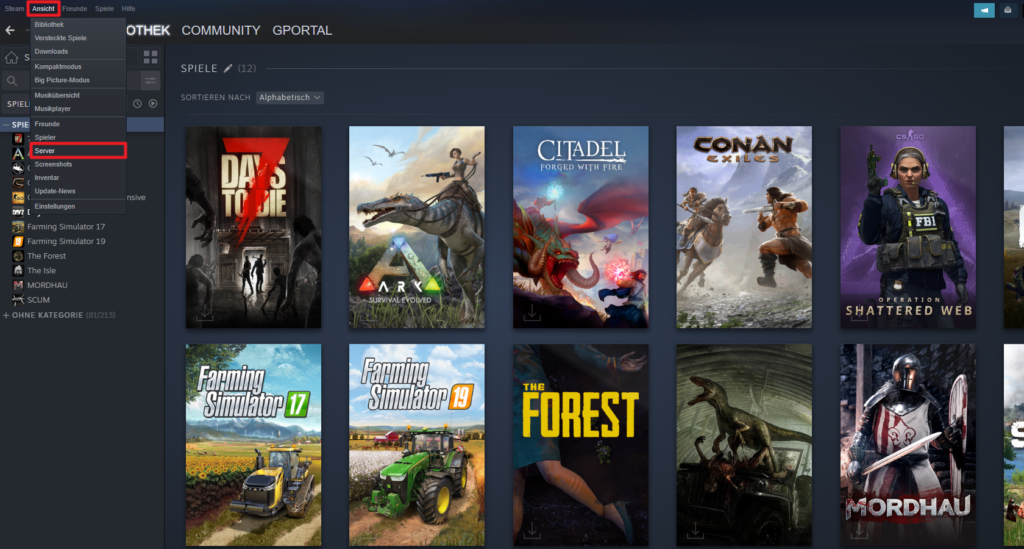
Connect via Steam
- Open Steam and click on “Show”
- Click on “Server”
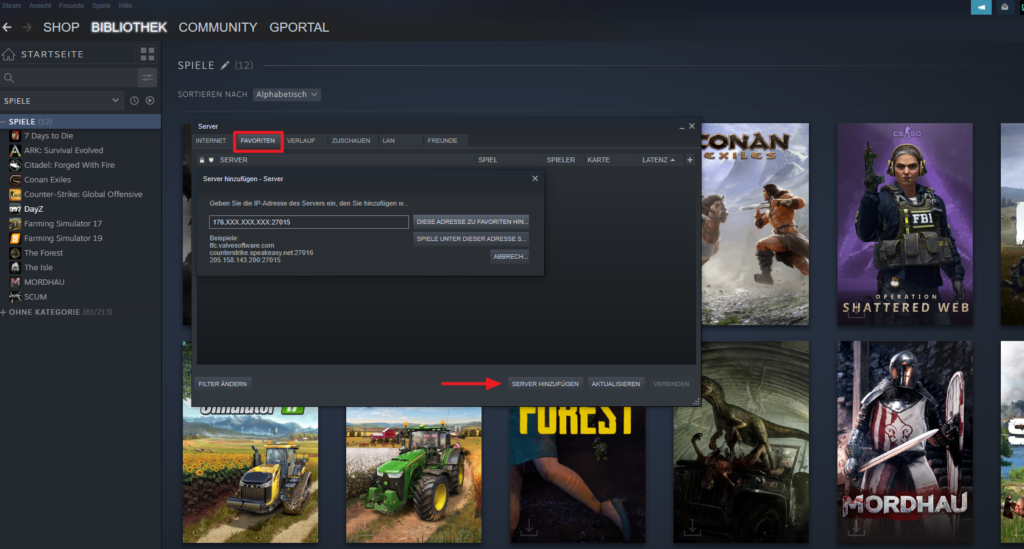
- Navigate to “Favorites” and right mouse click in the empty field
- Enter your server’s IP and query port
- Update Favorites
- Double click on the new entry and connect
Connect via IP & port in the game
- Join game
- Click on the Connect with IP button
- Enter the IP at the top and the server port at the bottom
- Press Connect
- If there is a password, enter it
Connect via server name in the game
- Navigate to the “Server” tab in the game
- Enter the name of the server in the search field
- Click the server name
- Click on “Connect“
similar articles


7 Days To Die
7 Days To Die Server – Become a game admin

7 Days To Die