Windrose
Rent a Windrose Server
Genre:
Open-World-Survival
Studio:
Kraken Express
Publisher:
Kraken Express, Pocketpair Publishing
Rent a server
Rent a Windrose Server
Genre:
Open-World-Survival
Studio:
Kraken Express
Publisher:
Kraken Express, Pocketpair Publishing
Windrose – Changing world settings via the GPORTAL web interface
To help you customize your server exactly the way you want, we offer a range of settings that you can easily adjust and save via our website’s web interface. It’s really super easy.
Proceed as follows:
- Log in to your GPORTAL account on the website
- Click on “My Servers” and then select your Windrose server
- First, stop your server before making any changes to the settings
- Now you’ll see “Basic Settings” on the left-hand side
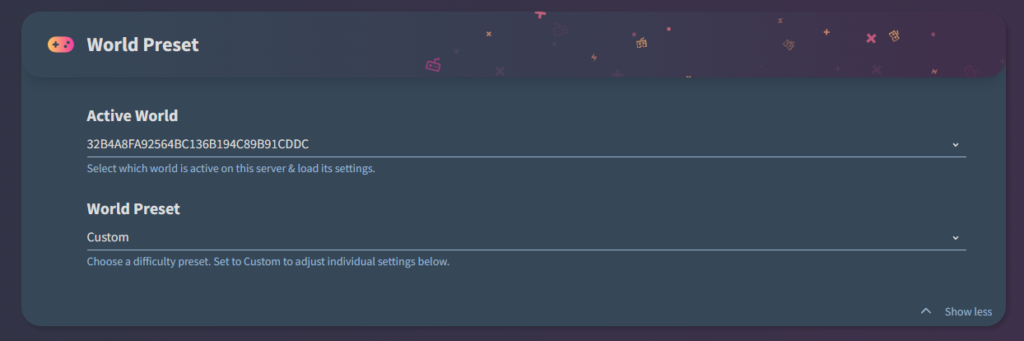
- If you click there and then scroll down a bit in the new window, you’ll first see the “World Presets”
- With these settings, you can, for example, manage the save games on your server and change the game’s difficulty level
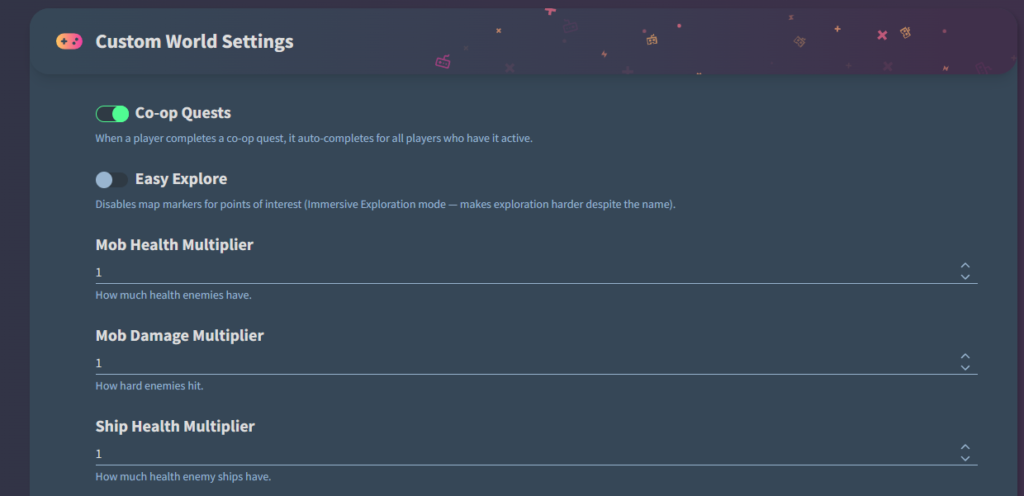
- Further down, you’ll find the “Custom World Settings”
Important These only work if you’ve previously selected “Custom” in the World Preset.
- Here, you can adjust individual settings such as enemy damage and more as you like (the list in the screenshot is not exhaustive)