Minecraft Clock
The Minecraft clock tells you whether stepping outside will end in sunshine or a skeleton ambush. Unlike most tools, it doesn’t fight, mine or build anything. It just shows you where the sun and moon are in the overworld day/night cycle, and it does so reliably no matter where it sits in your inventory. Whether you need to survive underground, decorate your base with a wall frame, time your multiplayer adventures or automate events with commands, the Minecraft clock is one of the most versatile utility items in the game.
Overview Minecraft Clock:
Minecraft Clock Basics: Item Properties & the ‘Other Clock’
The Minecraft clock is a common-rarity, stackable item (stack size: 64x) that displays the in-game time by showing the real-time position of the sun and moon on its animated dial. It works automatically everywhere it appears:
- in hand or off-hand
- in any inventory slot
- in the crafting grid
- in an item frame (wall-mounted)
- even as a dropped item on the ground
No activation required: the dial updates continuously as long as the clock exists in the overworld.
Java vs. Bedrock:The Minecraft clock behaves slightly differently depending on edition. In Java Edition, the clock can be viewed under the item statistics page and in the recipe book once the recipe is unlocked. In Bedrock Edition, the clock’s dial in out-of-cycle dimensions (Nether, End) rotates continuously clockwise rather than spinning randomly. Still useless for timekeeping, but at least it doesn’t flicker.
The Redstone Clock Is Something Entirely Different
When players say ‘clock’ in a redstone context, they usually mean a clock circuit: a looping pulse generator that toggles its output on, off, on, off at a set rate. This has nothing to do with the Minecraft clock item. A redstone clock circuit powers automations like blinking lamps, piston sequences or timed dispensers. You control its speed by adjusting repeater delays in the loop.
Tip:Avoid ultra-fast torch-based redstone clock circuits. Redstone torches can ‘burn out’ if forced to toggle too rapidly, stopping the circuit cold. For fast clocks, use a repeater-loop or a comparator-based design instead.
How to Read a Minecraft Clock
Quick Reference: In-Game Time ValuesUse these as anchors when pairing the clock with commands or scheduling multiplayer events:
- dawn / sunrise: ~23,000 ticks
- noon: 6,000 ticks
- dusk / sunset: ~12,000 ticks (hostile mobs begin spawning)
- midnight: 18,000 ticks
You can sleep a few seconds after the clock dial reaches exactly dusk, so no need to wait for full darkness.
The Minecraft clock doesn’t display a number. It shows two halves, a bright day side and a dark night side, rotating clockwise in real time. The position of the dividing line tells you where you are in the 24,000-tick cycle (roughly 20 real-world minutes per full day).
Minecraft Clock in the Nether & the End
Neither the Nether nor the End have a day/night cycle, so the Minecraft clock is non-functional in both dimensions. In Java Edition the dial spins rapidly and randomly, decorative chaos at best. In Bedrock Edition it rotates steadily clockwise. Either way, it gives no usable time information. Don’t rely on it there.
How to Craft a Clock in Minecraft
The Minecraft clock recipe is straightforward. You need two ingredient types, both obtainable in the early-to-mid game:
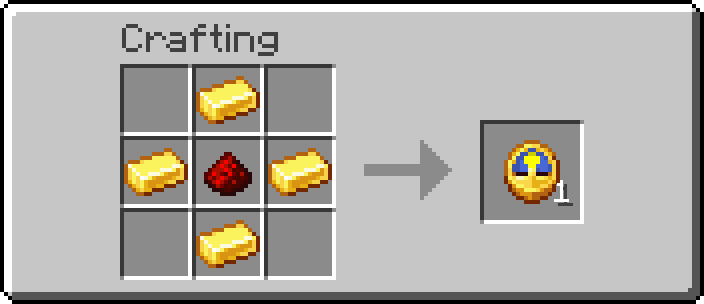
Simply place the redstone dust in the center of a crafting grid. Put one gold ingot each in the top, bottom, left and right slots to make it look like a diamond shaped pattern. The four corners stay empty.
Both ingredients are renewable. Gold ingots come from smelting gold ore (found between Y −64 and Y 32 in most biomes, with extra surface generation in badlands) or from piglins in the Nether. Redstone dust is mined from redstone ore, typically found between Y −64 and Y 16 with the highest density around Y −59.
Get a Minecraft Clock Without Crafting
Spending gold ingots on a Minecraft clock isn’t always necessary. There are two non-crafting routes:
- looting
- trading
Both are valid depending on your game stage and what resources you have available.
Chest Loot
Minecraft clocks appear in two types of generated structure chests:
| Structure | Chest Type | Loot Chance |
| ruined portal | portal chest | ~7.3% |
| shipwreck | map chest | ~7.7% |
Ruined portals generate in all overworld biomes and in the Nether. Shipwrecks appear in ocean biomes (and rarely on beaches or inside icebergs). Both are reasonably common early-game finds, making the loot route a decent shortcut if you stumble on one before mining enough gold.
Villager Trading
Expert-level librarian villagers sell a Minecraft clock for emeralds. The trade price and availability differ by edition:
| Edition | Chance | Cost |
| Java Edition | 50% (1 in 2 librarians) | 5x emeralds |
| Bedrock Edition | ~33.3% (1 in 3 librarians) | 4x emeralds |
The librarian requires a lectern as its job site block. If you need multiple clocks (for a wall clock display, for example) mass-trading with a librarian in an emerald-rich world is faster than mining and smelting the gold individually.
Minecraft Clock Uses
A Minecraft clock has a short but genuinely useful list of practical applications. Here’s an overview before the details:
- underground time orientation
- sleep timing
- wall display
- command integration
- multiplayer coordination
Underground Navigation
The Minecraft clock’s most practical use is exactly this: you’re deep in a mineshaft, you’ve lost track of time, and you don’t want to surface into a horde of skeletons. Glance at the Minecraft clock: if the dial shows darkness, wait or keep mining. No more blind exits.
Sleep Triggering
The dial reaches dusk a few seconds before you can sleep. This makes the clock a precise sleep trigger. It’s quite useful in multiplayer sessions where all players need to sleep simultaneously to skip the night. One player watches the clock and calls it.
Minecraft Clock on a Wall
The clock is not a placeable block. To mount a Minecraft clock on a wall, place it inside an item frame attached to any block face. The clock continues to display the correct in-game time while framed, making it one of the few functional decorative items in the game. In the Nether or End, a framed clock still behaves the same as it does when carried: non-functional, spinning decoratively.
Tip:Use a glow item frame instead of a regular item frame to keep the Minecraft clock visible in dark rooms without placing torches nearby. The glow item frame doesn’t emit light itself but prevents the item inside from darkening.
Command Integration
Pairing the clock with commands unlocks scheduling. The /time set and /time query daytime commands use the same tick values the clock displays. In multiplayer you can script day/night cycles, announce sunset to all players or trigger events at precise in-game hours using command blocks paired with time comparators.
Piglin Interaction
An easy-to-overlook mechanic: piglins are attracted to Minecraft clocks. Drop a clock on the ground near piglins and they’ll run toward it and inspect it. This takes 6 seconds in Java Edition and 8 seconds in Bedrock Edition. Then, they’ll pocket it. This makes clocks a cheap distraction tool in Nether exploration if you have spares and need a few seconds to slip past.
FAQ
Place 1x redstone dust in the center of a crafting grid, then surround it with 4x gold ingots in a diamond pattern (top, bottom, left, right). Corners stay empty.
It tracks the sun and moon position in the overworld and displays the result as a rotating dial. It updates anywhere it sits: hand, inventory, crafting grid, frame, or dropped on the ground. It doesn’t function in the Nether or End.
Read the dial as day vs. night. The ‘bright half = sun’ is above the horizon; the ‘dark half = night’. For precise timing: noon = 6,000 ticks, sunset = ~12,000, midnight = 18,000, sunrise = ~23,000. You can sleep a few seconds after dusk appears on the dial.
Craft it (4x gold ingots + 1x redstone dust), loot it from ruined portal or shipwreck map chests (~7% chance each), or buy it from an expert-level librarian villager for 4-5x emeralds.
The clock itself is not placeable. Mount it in an item frame to display it on any wall. It continues showing the current time while framed.
The redstone clock circuit is a redstone build, not an item. It generates a repeating pulse used to automate machines and timing sequences. Common types include repeater loops, comparator clocks and hopper clocks. It has no connection to the clock item beyond the name.
No, the Nether has no day/night cycle, so the dial spins randomly (Java) or clockwise (Bedrock). Neither tells you the time. Use it purely as decoration there if at all.
Yes, piglins are attracted to dropped Minecraft clocks and will run over to inspect one for 6 seconds (Java) or 8 seconds (Bedrock) before adding it to their inventory. This makes a spare clock a cheap distraction tool in Nether navigation.
Final Tick – Stop Guessing, Start Clocking
The Minecraft clock is one of the most underrated utility items in the game. It keeps you oriented underground, lets you time sleep to the second, decorates your base as a live wall display and even doubles as a piglin distraction in a pinch. Pair it with commands for proper server scheduling, drop it next to a redstone clock circuit for the nerdiest home décor in the overworld, or just mount it in an item frame and pretend your base is a five-star hotel. Whatever you do: never trust it in the Nether. Try it all on a Minecraft server from GPORTAL and find out just how much a tiny golden disc with a spinning dial can do.


