How to Play Minecraft
Minecraft is still one of the most popular and versatile games you can find, offering endless opportunities for creativity, adventure and survival. Even though it has been around for over 15 years, new players are picking it up every single day. If you are one of them, we wish you a blocky welcome into the ever-expanding world of Minecraft!
Whether you’re exploring vast landscapes and biomes, building magnificent structures or fighting off dangerous mobs, Minecraft has much to offer. But with all those limitless possibilities, the first few hours in a new world can feel overwhelming. This Minecraft beginner guide will walk you through everything you need for your first steps in Minecraft: from basic controls to surviving your first night and beyond.
Overview How to Play Minecraft:
Survival vs. Creative: Choosing Your Minecraft Game Mode
Before you jump into a new world, you’ll need to decide how you want to play, as Minecraft offers different game modes to choose from:
- survival mode is all about gathering resources, crafting items and tools and staying alive. You’ll need to manage your health and hunger while avoiding hostile mobs like zombies, skeletons or creepers.
- creative mode removes all survival elements and gives you unlimited resources. You can fly, build massive structures and experiment with different designs without worrying about enemies or resource gathering.
For Minecraft beginners, survival provides the classic Minecraft experience with challenges that help you learn the game’s mechanics. However, if you just want to explore and build without limits, creative is a great way to practice that. No matter which mode you pick, you can also set a difficulty level: peaceful (no hostile mobs and hunger doesn’t deplete), easy, normal (the default) or hard (hunger can kill you and mobs hit harder). For your first run-through, normal is the sweet spot, challenging without being punishing.
Note:There are two more game modes: adventure mode and hardcore mode. However, these are more specialized, so we wouldn’t recommend them for beginners.
Minecraft Basic Controls for Beginners
The controls in Minecraft are simple but essential to know before starting your adventures. Here’s a quick rundown for the Java Edition on PC:
- movement: use W-A-S-D
- jump: press spacebar
- mine blocks / attack: left-click
- place blocks / interact: right-click
- inventory: press E to open.
- sprint: double-tap W or press the dedicated sprint button
- crouch / sneak: press shift
- pause / settings: press ESC
- debug Info: press F3
If you’re playing on Bedrock Edition (which covers mobile, Xbox, PlayStation and Nintendo Switch) the layout adapts to your device. On console, you use the analogue sticks and face buttons; on mobile, you get touch controls with a customisable on-screen layout. The core actions (mine, place, open inventory) stay the same across platforms, so once you master the basics on one device, switching between editions feels natural.
Once you’re familiar with these, it’s time to hop into your first Minecraft world. Don’t worry if you forget a button: you can always change the controls from the options menu by pressing ESC.
First Steps in Minecraft: What to Do First
The first day in Minecraft is crucial. You need to gather resources, craft tools and secure a shelter before nightfall, when monsters appear. These are our five priorities for your first in-game day:
- gathering wood
- getting a crafting table
- upgrading to stone tools
- finding food
- crafting a bed
- building your first shelter
Let’s walk through them step by step.
1. Gather Wood for Tools & A Crafting Table
As soon as you spawn, find the nearest tree and start punching it! Gather logs by holding down the action button, then open your inventory and craft the logs into wooden planks by filling the 2×2 crafting window.
4x wooden planks = 1x crafting table
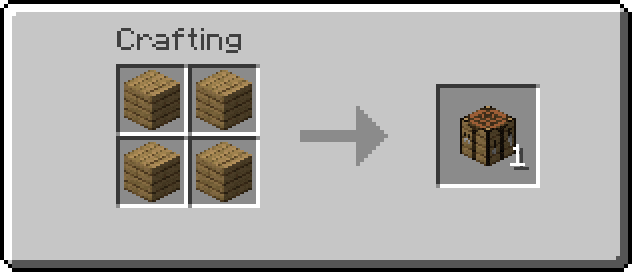
With 4x planks (one in each slot) you can make a crafting table, which allows you to create more advanced tools and items. If the sheer number of recipes feels overwhelming, the little green recipe book in the crafting interface has you covered. With the crafting table, follow the recipes in our tools guide to craft:
This first step shouldn’t take long. Now you’re ready to mine stone properly.
2. Upgrade to Stone Tools
Wooden tools won’t last long, so the next priority is stone. Look for a nearby hill, a cave or simply dig down to find cobblestone. Use your wooden pickaxe to mine at least 8x cobblestone, then craft:
- a stone pickaxe to mine ores faster
- a stone axe for faster wood gathering + extra damage
- a stone sword to defend yourself from hostile mobs
These three tools cover your basic needs on day 1. You’ll expand your toolkit later.
Minecraft 101: Day-One-Don’ts
A few golden rules that will save Minecraft beginners plenty of early deaths:
- never dig straight down – you might drop into lava or a deep ravine
- never dig straight up – falling gravel or water will ruin your day
- never leave without any torches on a mining trip
- never go without a spare pickaxe & some food in your hotbar
- never forget to mark your spawn point with a dirt pillar or noting the coordinates before wandering off
3. Find Food
Running around, mining and fighting will drain your hunger points. So your next priority should be food to keep exploring and to regenerate health, since a full hunger bar is essential for healing. The best early food sources are:
- animals: cows, pigs, chickens and sheep drop meat and spawn regularly in most biomes
- apples: sometimes drop from oak trees, a good fallback when no animals are around
- sweet berries: found in taiga forests, though they only give minimal hunger points
- wheat: can be harvested in villages and crafted into bread
Killing animals gives you raw meat, but cooking it in a furnace (built from 8x cobblestone) restores more hunger points and (more importantly) more saturation. That’s the hidden mechanic behind the hunger bar that determines how long your hunger stays full. It’s why a cooked steak always beats a raw one.
4. Look for Sheep to Craft a Bed
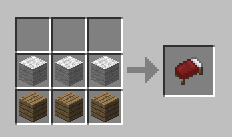
A bed lets you sleep through the night to skip hostile mobs and sets your respawn point in case you get killed. Gather 3x wool (by shearing or killing sheep) and combine them with 3x wooden planks to craft a bed. Place it inside a small shelter for safety.
3x wool + 3x wooden planks = 1x bed
5. Build Your First Shelter
When the sun starts setting, you’ll want a safe place to stay. There are a few options for your Minecraft first build. The simplest way would be a small wooden hut designed as a 3×3 house with walls and a door. It will keep monsters out. If you’re short on wood, a dirt hut will do the trick and unlocks a classic Minecraft core memory for every player. You could also dig into a hillside. Carving a small cave into the side of a mountain is quick and effective. Another option (sligjty dramatic) would be to bury yourself in the ground. Out of time and out of materials? Dig 3x blocks down, cover yourself with a dirt block and wait until morning, bonus points if you mine some coal and even iron while you wait.
Tip:If you are really lucky, you spawn close to a village. There, you can just enter a house, go to bed and set your spawn point while skipping the night. And it gives you some great supplies for beginners if you plunder all chests there.
How to Survive Your First Night in Minecraft
So you’ve got tools, food and a shelter. Now comes the real test: making it through the dark. The Minecraft first night is where many new players learn their hardest lessons, but with the right preparation, it’s also your first true victory. Here’s how to survive a night in Minecraft without panicking.
The Day-Night Cycle Explained
A full day in Minecraft lasts around 20 real-world minutes: roughly 10 minutes of daylight, 7 minutes of night, plus a short dawn and dusk in between. Hostile mobs spawn in darkness (light level 0), so once the sun sets, zombies, skeletons, creepers and spiders start appearing in any unlit area. Knowing the rhythm helps you budget your tasks: gather and explore during the day, retreat and craft at night.
Craft A Shield & Basic Defence
A stone sword alone won’t cut it against a creeper sneaking up on you. If you found any iron on day 1, craft a shield from 6x wooden planks and 1x iron ingot. Hold it in your offhand to block incoming arrows and explosions. Combined with your sword (and some proper armor later on) it’s the single biggest survival upgrade in the early game.
Sleep Through the Night & Watch Out for Phantoms
If you crafted a bed, use it the moment night falls: right-click the bed and you’ll skip straight to morning. Sleeping also sets your respawn point, so dying hurts a lot less. One warning though: if you go 3x in-game nights without sleeping, phantoms start spawning above you and diving down in swarms. So even if you’re having a productive night mining, make sure to sleep every few days to keep them away.
Minecraft Starter Tips
Once you’ve made it past your first night, a few more Minecraft starter tips will speed up your progression massively. The first thing to keep in mind is location: where you settle down matters.
Find A Village for An Easy Start
If you’re lucky, you might spawn near a village. Villages are a fantastic starting point because they provide so many resources at once:
- houses for instant shelter
- easy food with wheat, potatoes and carrots in the fields
- villagers who trade items (more useful later on)
- pre-crafted beds, so you don’t have to gather wool yourself
You may also find helpful loot in the chests around the village, sometimes even diamonds! Villages make early-game survival dramatically easier and are an ideal spot for your first base.
Light Up Your Surroundings
We highly recommend lighting up your surroundings as best as you can, unless you want some surprise visitors to spawn. The simplest way is placing torches. Torches are crafted from 1x stick and 1x coal, both easy to obtain, so don’t be stingy. Place them across your starter base, inside caves and along any tunnel you dig. Underground torches are essential just to see where you’re going, so always keep a stack in your inventory on mining trips.
More Essential Minecraft Survival Tips for Beginners
A handful of extra habits separates a clueless newcomer from a confident survivor. These are the most important Minecraft survival tips for beginners to internalise from day 1:
- carry a water bucket (breaks falls and extinguishes fires)
- note your base coordinates with F3 on Java
- build a second bed and a backup chest as soon as possible for redundancy
- Plant saplings from every tree you chop so wood never runs out
- cook your meat, raw food is almost always inferior
- Keep a shield & sword in your hotbar at all times
What Comes After Your First Steps in Minecraft?
That’s pretty much up to you. Once you’ve established a basic starter base with chests for your valuables, a furnace for smelting and a comfortable bed, it’s time to really get your Minecraft adventure going. The usual progression looks like this:
- upgrading from stone to iron gear, found deep underground
- hunting for diamonds around Y-level -59 (watch out for lava!)
- building a Nether portal with obsidian to access the fiery dimension
- gathering blaze rods and ender pearls to eventually fight the ender dragon
From here, your possibilities are limitless. Whether you want to build a massive mansion, explore the deep caves hidden underground, or tame every animal in the game – it’s your world, your rules. And here’s yet another tip: Minecraft is even more fun when played together. You can start with a local LAN world, join a public realm, or rent your own server for the full multiplayer experience.
FAQ
Punch a tree to collect wood, craft a crafting table, and make wooden tools. Then mine some cobblestone for stone tools, find food, craft a bed, and build a simple shelter – all before your first night.
Prep yourself with tools: craft a stone sword, get a bed, and either sleep through the night or hide inside a sealed dirt or wooden hut. Light up the area around you with torches to prevent mobs from spawning.
Survival mode on normal difficulty gives you the full Minecraft experience without being punishing. Peaceful is even easier (no monsters at all), while creative is best for experimenting and building freely.
Both editions play nearly identically in the basics. Java is preferred for mods, large community servers and technical redstone; Bedrock runs on almost any device and supports cross-play. Pick whichever matches the devices you already own.
A full day-night cycle lasts about 20 real-world minutes: roughly 10 minutes of daytime, 7 minutes of nighttime, plus short dawn and dusk transitions.
Sleep in a bed. Using a bed at night or during a thunderstorm anchors your respawn point next to it. If you die without one set, you’ll respawn at the original world spawn.
Not strictly, you can play locally via LAN or use Microsoft’s Realms service. But a dedicated server gives you 24/7 uptime, mod support and much better performance for larger groups.
Block by Block: Your Minecraft Journey Starts Here
Surviving your first night, crafting your first pickaxe, placing your first torch – every Minecraft story begins with these small victories, block by block. From here, the world is literally yours to shape: cosy cottages, redstone empires, ocean monuments, or an all-out quest to slay the ender dragon. Whatever you build, remember: the best adventures happen with friends. Rent your own dedicated Minecraft server and explore the endless worlds of Minecraft with your crew in multiplayer, your next chapter is just a spawn away.
similar articles


Minecraft
How to download and install Minecraft

Minecraft